

Migrate from MySQL to MSSQL
This guide outlines the steps and prerequisites required to migrate a MideyeServer database from MySQL to MSSQL.
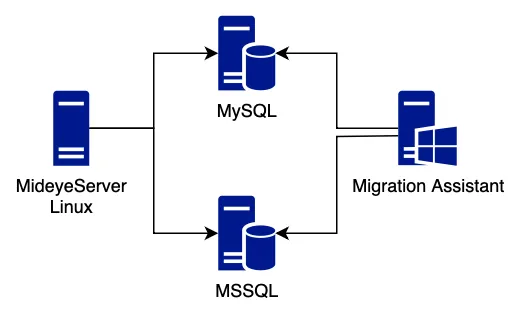
Prerequisites
Section titled “Prerequisites”- MSSQL Server (Standard or higher) with MSSQL Agent running.
- MideyeServer instance for populating the MSSQL database (Note: This will cause downtime during population).
- Network Access: MideyeServer must be able to connect to the MSSQL server.
- Keystore Access: If deploying a new MideyeServer after migration, ensure it is configured with the same
keystore.p12file and corresponding keystore password, specified in theapplication-prod.ymlfile, of the current MySQL-based MideyeServer. - Windows Client with access to both MySQL and MSSQL servers.
- Microsoft SQL Server Migration Assistant (SSMA) for MySQL installed on the Windows client. Download here
- Credentials for both MySQL and MSSQL databases.
- Install SSMA: Install Microsoft SQL Server Migration Assistant for MySQL on a Windows client.
- Create MSSQL Database: On the MSSQL server, create a new database for MideyeServer.
- Prepare Config Files:
- On MideyeServer, copy
application-prod.ymlinto two new files:application-prod-mssql.ymlandapplication-prod-mysql.yml.
- On MideyeServer, copy
- Configure MSSQL YAML: Update
application-prod-mssql.ymlwith your MSSQL settings. - Test Connectivity: From the MideyeServer, test the MSSQL connection:
/opt/mideyeserver6/config# telnet 172.26.128.1 1433Trying 172.26.128.1...Connected to 172.26.128.1.Escape character is '^]'.A successful connection will show Connected to 172.26.128.1.
Populating MSSQL
Section titled “Populating MSSQL”- Stop MideyeServer: This will cause downtime.
- Switch to MSSQL Config: Copy application-prod-mssql.yml to application-prod.yml.
- Start MideyeServer: The server will now populate the MSSQL database.
- Check Logs: Wait until the MideyeServer logs confirm it is running.
- Verify Tables in MSSQL: Check the MSSQL database; new tables like dbo.accounting and dbo.al_approver_group should be present.
- Revert to MySQL Config (Optional): If needed, stop MideyeServer, then copy application-prod-mysql.yml to application-prod.yml and restart it. This allows MideyeServer to remain operational while the data migration is performed on the side.
Migrating the Data
Section titled “Migrating the Data”- Open SSMA: On the Windows client, start Microsoft SQL Server Migration Assistant for MySQL.
- Create a New Project in SSMA.
- Connect to MySQL with the MySQL credentials.
- Connect to MSSQL using the newly created/populated MSSQL database.
- Select MySQL Database: Choose the Mideye database from MySQL as the source.
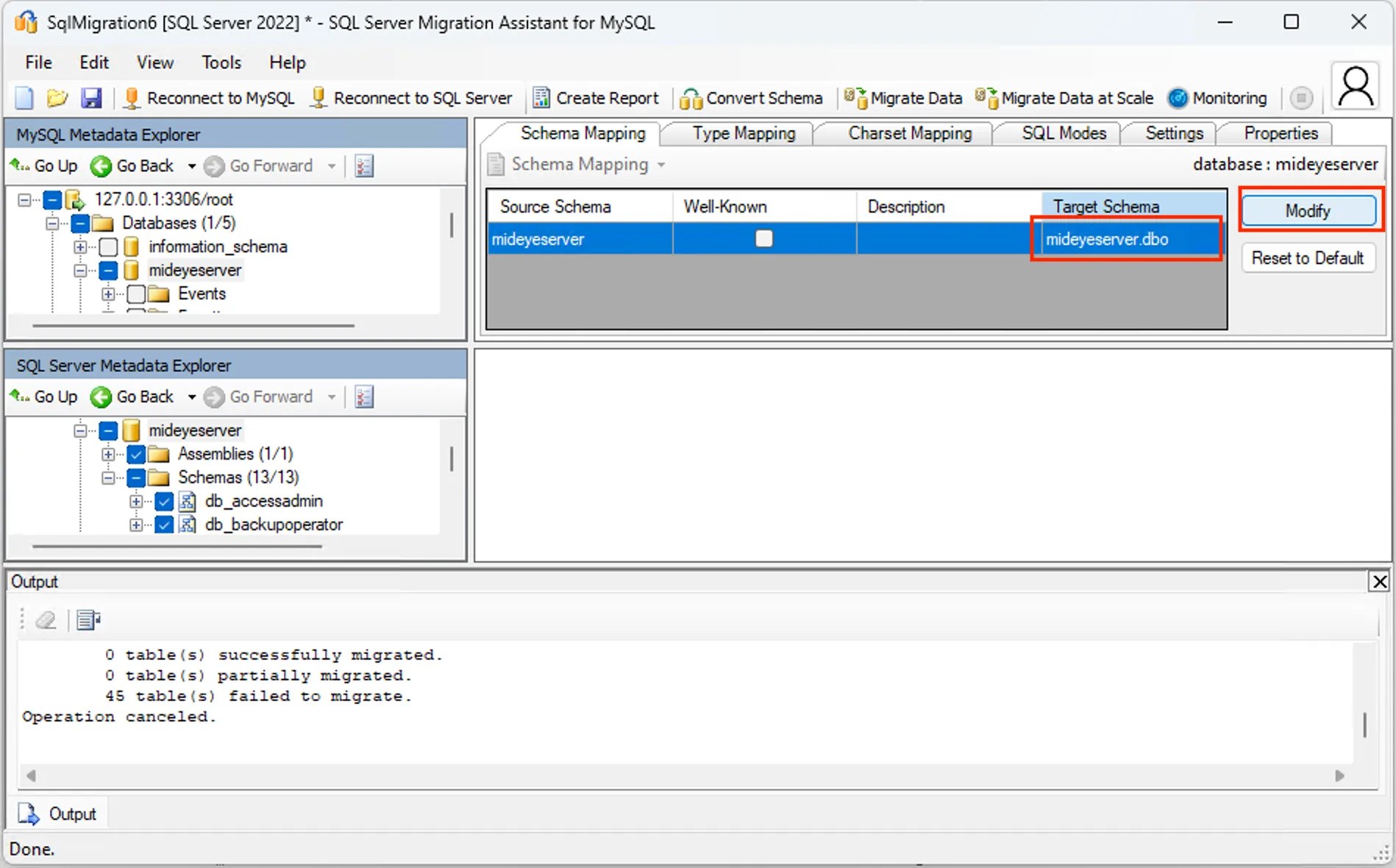
- Schema Mapping: Adjust the schema mapping so the MSSQL target schema is dbo instead of databasename.databasename.
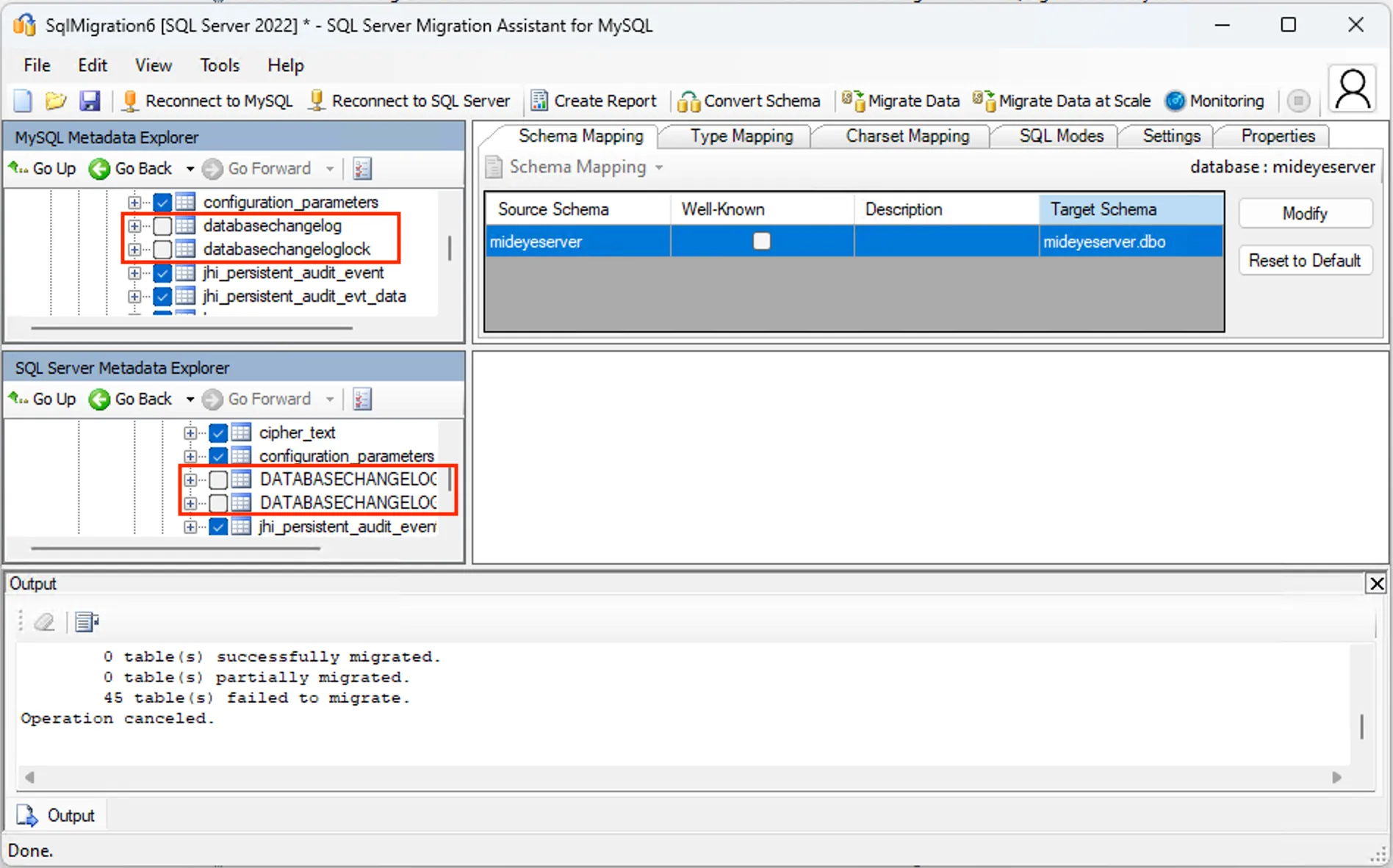
- Exclude ChangeLog Tables: Deselect DATABASECHANGELOG and DATABASECHANGELOGLOCK on both the MySQL and MSSQL sides.
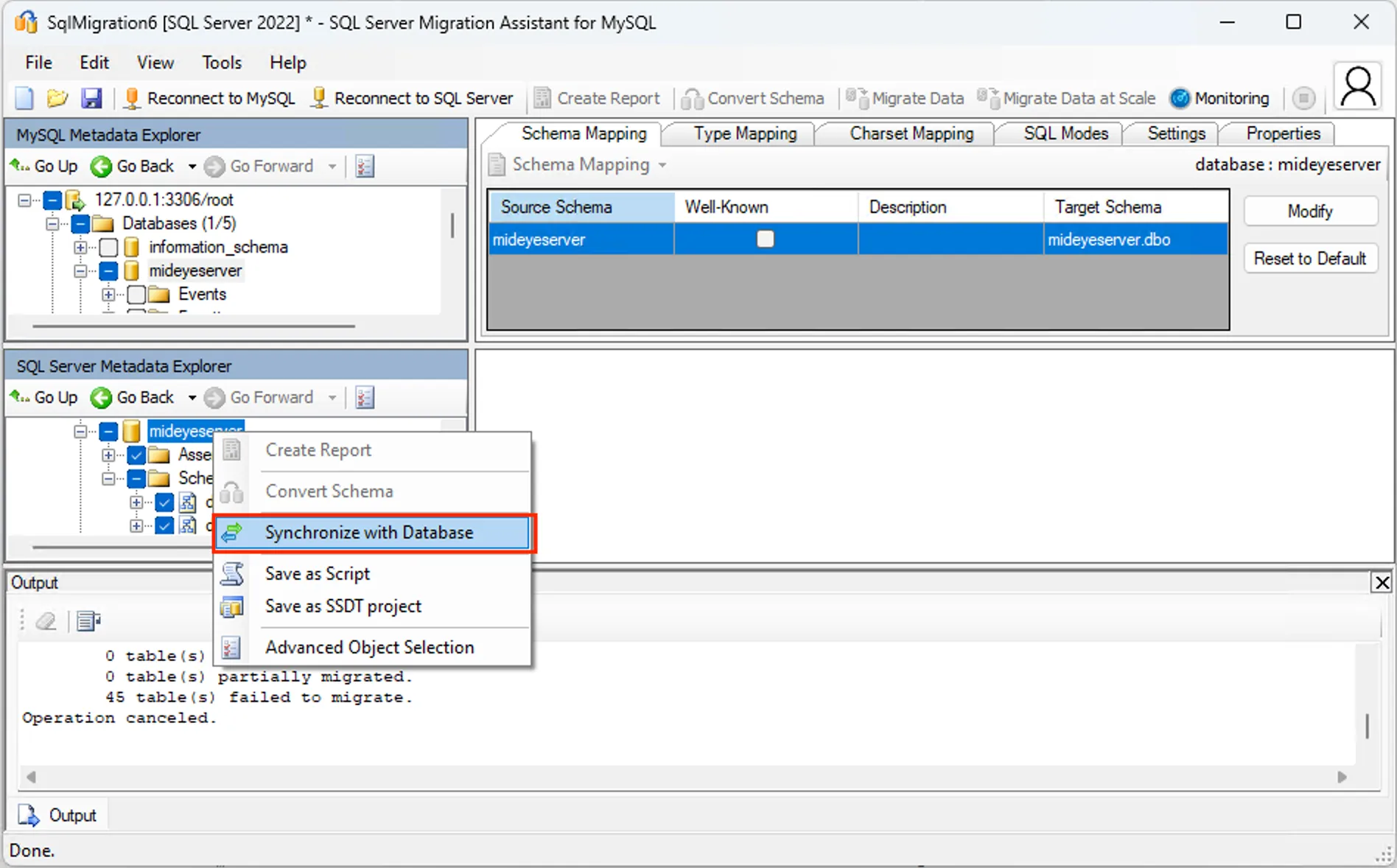
- Synchronize with Database: Right-click the MSSQL target database and select Synchronize with Database.
- Migrate Data: Back in SSMA, choose the MySQL source database and select Migrate Data.
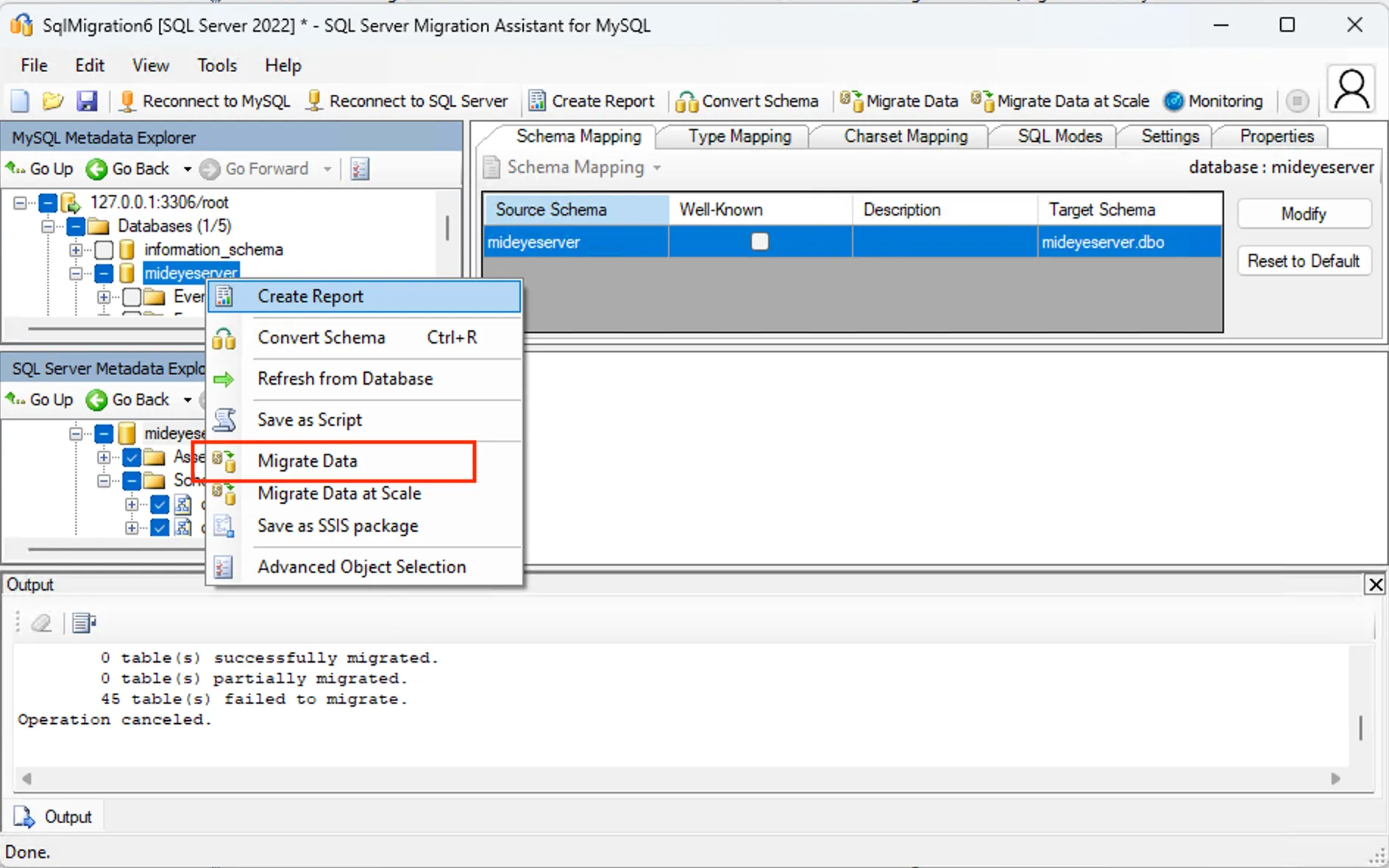
- Credentials: Enter the MySQL and MSSQL credentials as prompted.
- Ignore Warnings: If you see “Operation prerequisites not met,” continue the migration.
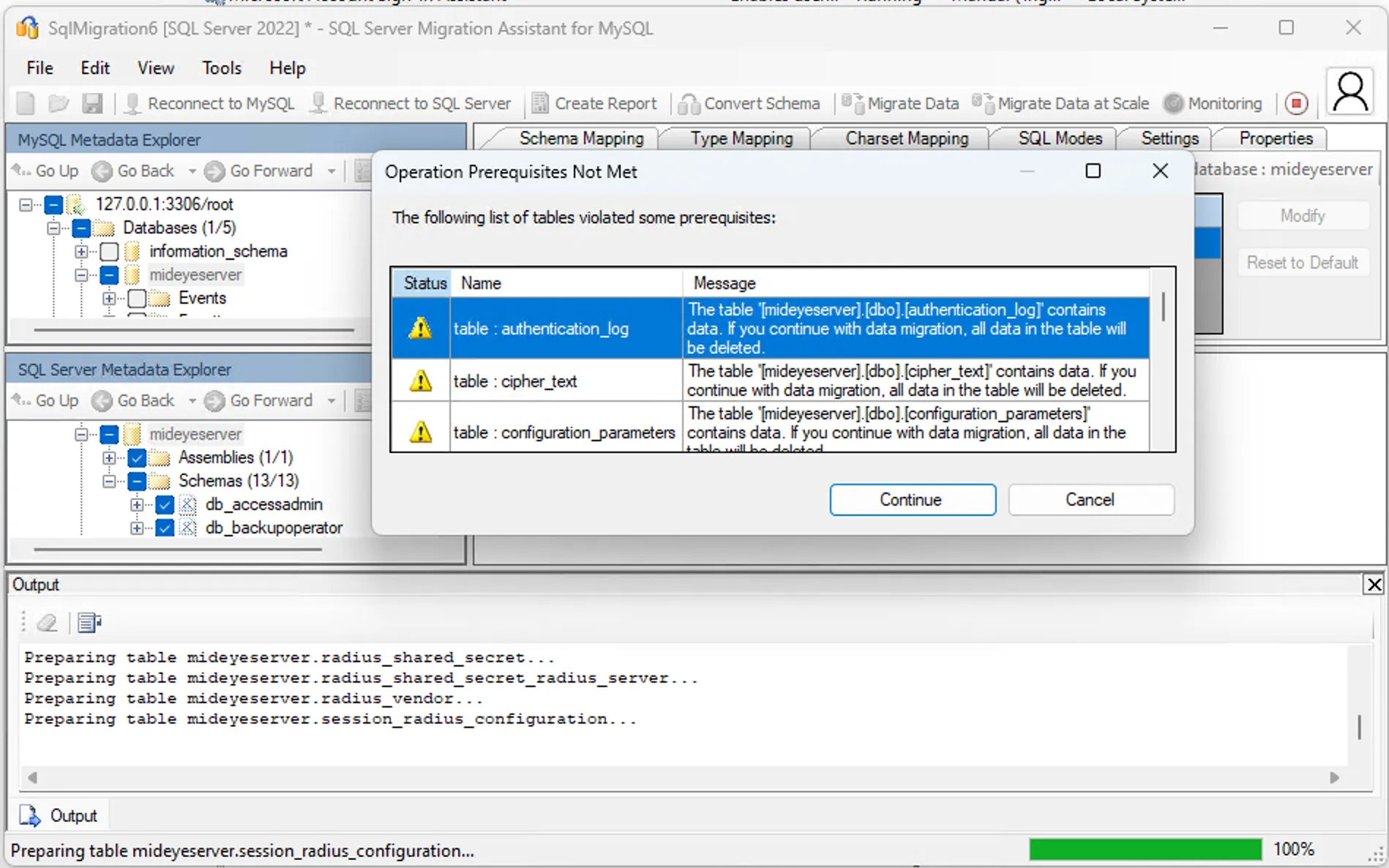
- The data is now migrated, Mideye Server can use MSSQL instead of MySQL.
Sample Configuration Files
Section titled “Sample Configuration Files”For complete database configuration examples and detailed instructions, see Database Configuration.
MSSQL Configuration (application-prod-mssql.yml)
spring: devtools: restart: enabled: false livereload: enabled: false datasource: type: com.zaxxer.hikari.HikariDataSource driver: com.microsoft.sqlserver.jdbc.SQLServerDriver url: jdbc:sqlserver://172.26.128.1:1433;databaseName=MideyeServer_DB;authenticationScheme=NTLM;useNTLMv2=true;user=PLACEHOLDER_DO_NOT_CHANGE_OR_REMOVE;password=PLACEHOLDER_DO_NOT_CHANGE_OR_REMOVE;encrypt=false username: mideyeuser password: 'SUPER_SECRET_PASSWORD' hikari: connection-test-query: SELECT 1 initializationFailTimeout: 10000 data-source-properties: cachePrepStmts: true prepStmtCacheSize: 250 prepStmtCacheSqlLimit: 2048 useServerPrepStmts: true jpa: database-platform: org.hibernate.dialect.SQLServer2012Dialect database: SQL_SERVER show-sql: false properties: hibernate.id.new_generator_mappings: true hibernate.cache.use_second_level_cache: false hibernate.cache.use_query_cache: false hibernate.generate_statistics: false liquibase: contexts: prod mail: host: localhost port: 25MySQL Configuration (application-prod-mysql.yml)
spring: devtools: restart: enabled: false livereload: enabled: false datasource: type: com.zaxxer.hikari.HikariDataSource url: jdbc:mariadb://172.26.128.1:3306/MideyeServer_DB?sslMode=TRUST username: mideyeuser password: 'SUPER_SECRET_PASSWORD' hikari: initializationFailTimeout: 10000 data-source-properties: cachePrepStmts: true prepStmtCacheSize: 250 prepStmtCacheSqlLimit: 2048 useServerPrepStmts: true max-lifetime: 600000 jpa: liquibase: contexts: prod mail: host: localhost port: 25