

LDAP to RADIUS Attribute Mapping for Mideye Server 4
Overview
Section titled “Overview”Need to assign VPN group policies or access levels based on Active Directory group membership? This guide explains how to configure LDAP-to-RADIUS attribute translation in Mideye Server 4, enabling automatic assignment of Cisco ASA group policies, Palo Alto user roles, and other vendor-specific RADIUS attributes based on AD group membership.
LDAP RADIUS Translation
Section titled “LDAP RADIUS Translation”LDAP-RADIUS translation maps Active Directory attributes (typically group membership) to RADIUS response attributes. This allows VPN concentrators and firewalls to apply different access policies based on the user’s AD group membership.
LDAP Server Configuration
Section titled “LDAP Server Configuration”To enable LDAP-RADIUS translation, configure the LDAP server settings in Mideye Configuration Tool. The memberOf attribute is used for Active Directory group membership lookups.
When all the tabs have been configured, save the configuration and click “Close” to restart the services.
To further extend the functionality of RADIUS, LDAP-RADIUS Translation can be used to assign specific users or group permission from LDAP when logging in using a VPN-concentrator.
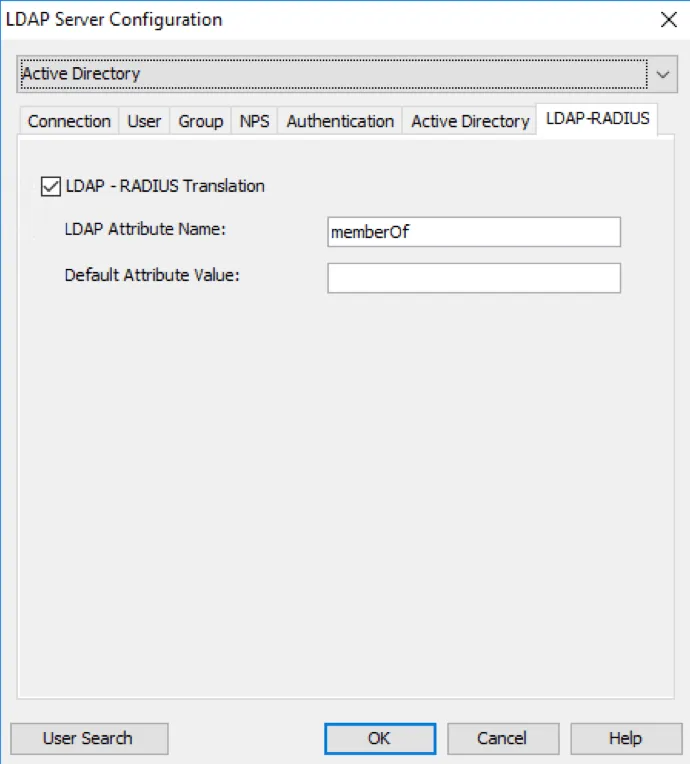
On Mideye Server, open Configuration tool and navigate to LDAP Servers and modify the selected LDAP Server. In the tab “LDAP-RADIUS” enable “LDAP-RADIUS Translation” and enter the LDAP attribute name that contains group membership information. For Active Directory, the attribute name is memberOf.
Enable LDAP RADIUS Translation
Create LDAP-RADIUS Translation rules
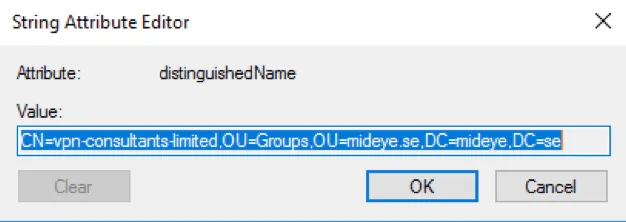
Section titled “Create LDAP-RADIUS Translation rules”In Configuration, navigate to the “LDAP-RADIUS Translation” tab. Press “New” and define a new rule corresponding to a specific group name attribute in the LDAP repository (see screenshot below). In the field “LDAP Attribute Value”, enter the full Distinguished Name of the group. Note that it is important that the exact group name is specified – the translation is both case and blank-space sensitive.
To make sure the correct DN is written, from ADUC, open the attribute editor of the group and simply copy the value and paste it into “LDAP Attribute Value” field in Mideye Server.
Starting from Mideye Server release 4.2.3 LDAP-RADIUS translation can also be used with wildcard/Java Regular Expressions, e,g. CN=Mideye-administrators.*
DN of the group
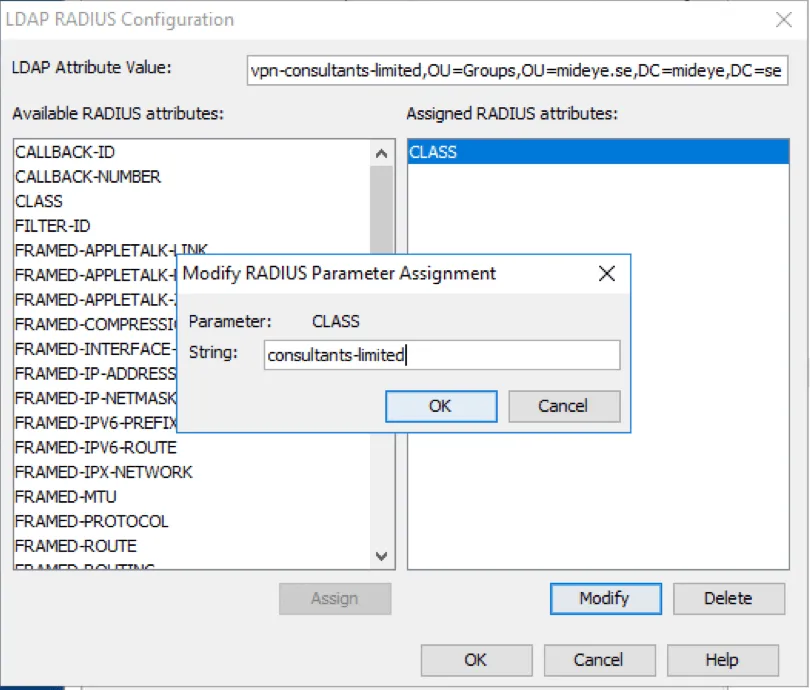
In the attribute list, select the desired attribute, and add a suitable string for the group and click “OK”. To know what attribute that should be used and how to configure it, consult the manufacturer of the VPN concentrator.
Adding a string to a class-attribute.
A complete guide for RADIUS Translation for Cisco ASA can be found here.
To save the configuration click “OK” followed by “Close” to restart the services.