Configure LDAP to RADIUS Attribute Translation
Overview
Section titled “Overview”LDAP-RADIUS Translation maps LDAP attributes (like group membership) to RADIUS attributes. This enables VPN concentrators and firewalls to assign permissions based on Active Directory groups.
Common use cases:
- Assign VPN profiles based on AD group membership
- Control network access based on department
- Map Web GUI administrative roles to LDAP groups
To further extend the functionality of RADIUS, LDAP-RADIUS Translation can be used to assign specific users or group permissions from LDAP when logging in using a VPN-concentrator.
Make sure that LDAP-RADIUS Translation is enabled in the LDAP-profile. Navigate to “Configuration” and “LDAP-RADIUS Translation”.
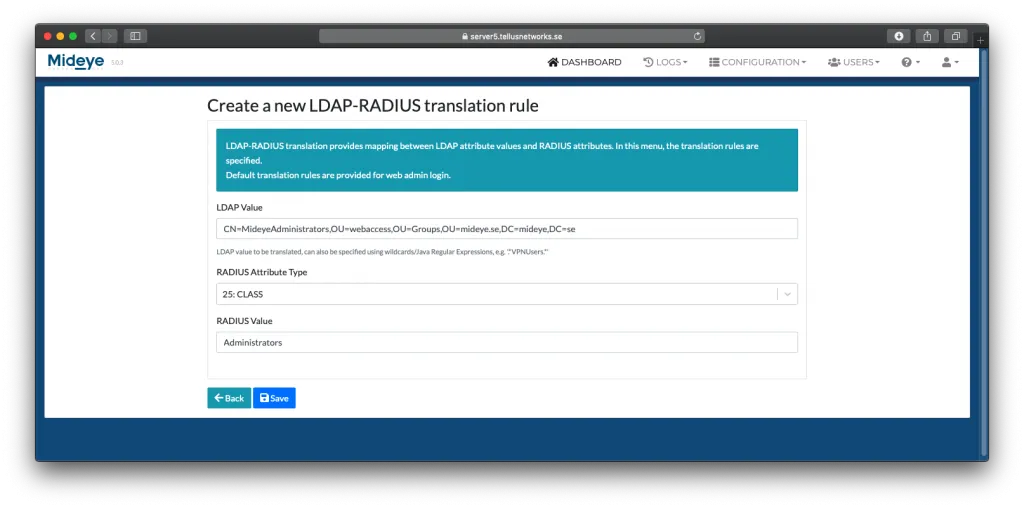
Press “Create a new LDAP-RADIUS translation rule”, and define a new rule corresponding to a specific group name attribute in the LDAP repository (see screenshot below). In the field “LDAP Value”, enter the full Distinguished Name of the group. Note that it is important that the exact group name is specified – the translation is both case and blank-space sensitive.
To make sure the correct DN is written, from ADUC, open the attribute editor of the group and simply copy the value and paste it into the “LDAP Attribute Value” field in Mideye Server. Wildcard/Java Regular Expressions, e,g. CN=Mideye-administrators.* are supported
In the RADIUS Attribute Type, select the desired attribute, and add a suitable RADIUS Value for the group and click “Save”. To know what attribute that should be used and how to configure it, consult the manufacturer of the VPN concentrator.