

Approvers page: who may approve an Assisted Login
This page is for administrators who set up Assisted Login. Assisted Login lets a user sign in with help when their own factor is not available, for example a lost phone. A named approver confirms the sign-in. The Approvers page says who may do that. For the setup steps and the Mideye Server settings, see Assisted Login. For the user’s view, see Assisted Login for users.
Two kinds of Assisted Login
Section titled “Two kinds of Assisted Login”| Kind | How the approver confirms | Backend |
|---|---|---|
| By phone (Touch) | The approver gets a request on the phone and approves it. | Mideye Cloud or Mideye Server |
| With codes (TOTP) | The user types their own code, then calls the approver, chooses their name, and types the code the approver reads out. The user’s own code is always required. | Mideye Server only |
You choose the kind for each user or group on Users, and for each hour on the Schedule.
With Mideye Cloud
Section titled “With Mideye Cloud”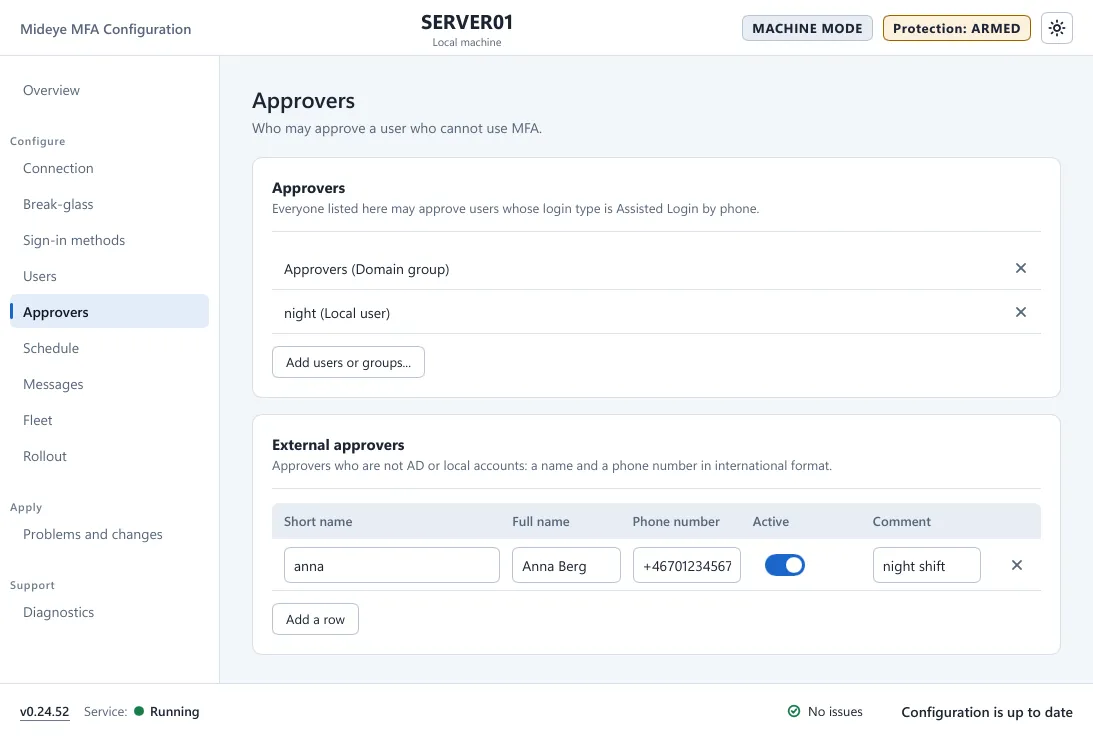
| Field | What it does | Default |
|---|---|---|
| Approvers card (Approvers (users and groups)) | “Mideye Cloud: AD users or groups who may approve an Assisted Login by phone. Not used with Mideye Server.” Press Add users or groups… to pick them. | None |
| External approvers card (“Approvers by phone number”) | “Approvers who are not AD or local accounts: a name and a phone number in international format.” For people without a Windows account, such as a security operations desk or a vendor on call. | None |
The table of external approvers has the columns Short name, Full name, Phone number, Active and Comment. Give the phone number in international format, for example +46701234567. Switch Active off to take someone out without deleting the row. “Everyone listed here may approve users whose login type is Assisted Login by phone.”
- The approver list is read from Active Directory at each Assisted sign-in. At most 20 approvers are used. Disabled accounts and the user themselves are skipped.
- A user who is both an Assisted Login user and an approver can never approve their own sign-in.
With Mideye Server
Section titled “With Mideye Server”The page shows the card Set on the Mideye Server and no lists. Approvers are set on the Mideye Server, in the Assisted login profile bound on the Authentication API endpoint that this computer uses. This includes approval by the user’s manager from Active Directory. Max approvers on the endpoint limits the list.
- An approver with a mobile number approves by phone.
- An approver with a token or authenticator app on the server approves with codes. This needs Enable OTP approval and Enable approver lookup on the Mideye Server’s Authentication API endpoint (in its Assisted Login section). With one of them off, the tile says “Mideye Server: approver lookup is off. Contact your administrator.” or “Mideye Server: OTP approval is off. Contact your administrator.”
The server tables and steps are in Assisted Login.
- Who may use Assisted Login is enforced on the endpoint. Treat the endpoint’s API token as a secret.
- If no approver can confirm, the tile says “No approver can confirm this sign-in. Contact your administrator.” Event 1001 names each approver that was left out and why.
- For approval by phone the user has 120 seconds and the approver 60 seconds.
- Turn on Reason at sign-in for Assisted Login on Sign-in methods to make the user give a ticket number.
- Event 1004 records an approval by code. Event 5201 means the approver list changed outside the normal apply.