

Mideye sign-in schedule: MFA, Assisted Login or Deny
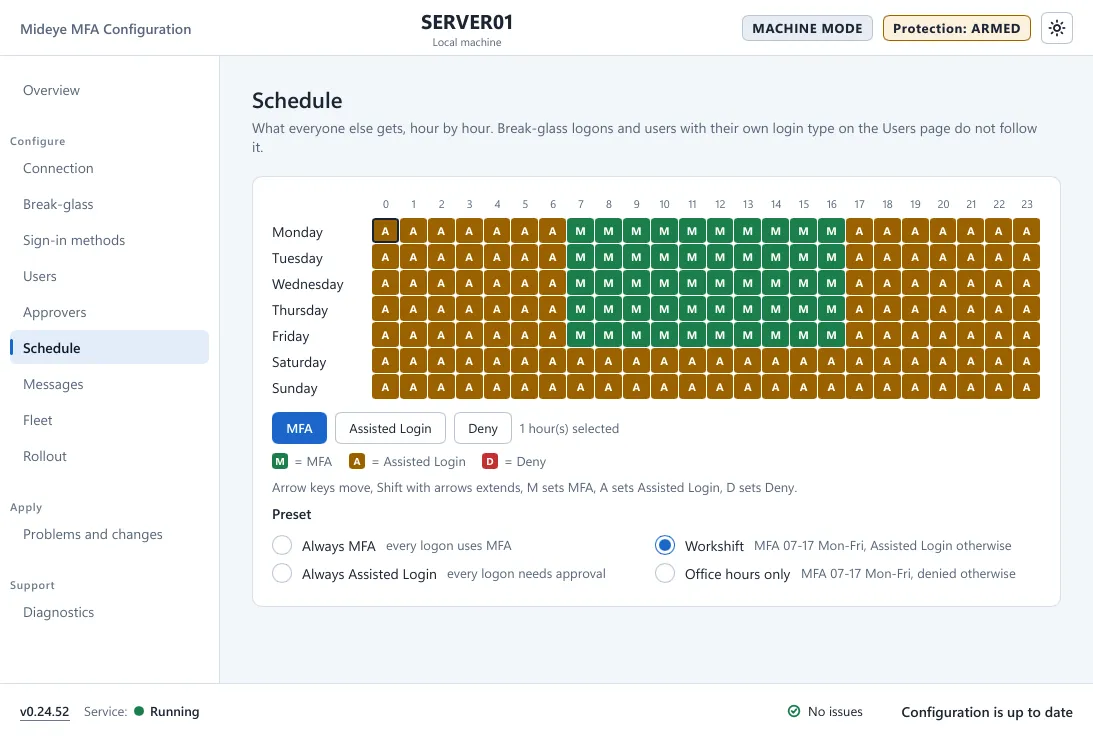
This page is for administrators who set when and how people may sign in. The Schedule page sets what everyone gets who has no row on the Users page. It is a grid of 168 cells: 24 hours for each day, Monday 00:00 to Sunday 23:00. Each cell is one of:
- MFA (
M): Touch or a one-time code. - Assisted Login with codes (TOTP) (
C): the user types their own code and the code an approver reads out. Needs a Mideye Server. - Assisted Login by phone (Touch) (
P): an approver confirms on the phone. - Deny (
D): nobody on the schedule can sign in during that hour.
The default is MFA in every hour.
Paint the grid
Section titled “Paint the grid”- Click or drag over cells to select them, or use the arrow keys (Shift extends the selection).
- Press MFA, Assisted Login with codes (TOTP), Assisted Login by phone (Touch) or Deny. The keys
M,C,PandDdo the same.
Presets
Section titled “Presets”| Preset | Pattern |
|---|---|
| Always MFA | Every sign-in uses MFA. |
| Always Assisted Login | Every sign-in needs approval. |
| Workshift | MFA from 07:00 to 17:00 Monday to Friday, Assisted Login otherwise. |
| Office hours only | MFA from 07:00 to 17:00 Monday to Friday, denied otherwise. |
| Custom | Your own pattern. |
The Assisted presets use the Assisted brush you picked last. On Mideye Cloud that is by phone. On a Mideye Server it is with codes until you pick one.
How the schedule fits with the rest
Section titled “How the schedule fits with the rest”- Break-glass sign-ins never follow the schedule. A Deny hour does not lock out a break-glass account.
- A user with a row on the Users page does not follow the schedule. The rule decides. Also in denied hours on that row lets it apply even in a Deny hour.
- If a user matches rules of both Assisted Login kinds, Assisted Login priority on Sign-in methods decides.
- With Mideye Cloud, Assisted Login with codes is not available. Choose Assisted Login by phone.
- A denied user sees “Sign-in to this computer is not allowed for this account at this time.” Event 1001 records the reason (
ScheduleDenyorUserOverrideDeny).