

Overview page: protection state and readiness checklist
This page is for administrators who check a computer. The Overview page is the first page of Mideye Configuration and answers one question: is this computer ready, and is MFA protecting it? Open it first. Come back to it when something does not work.
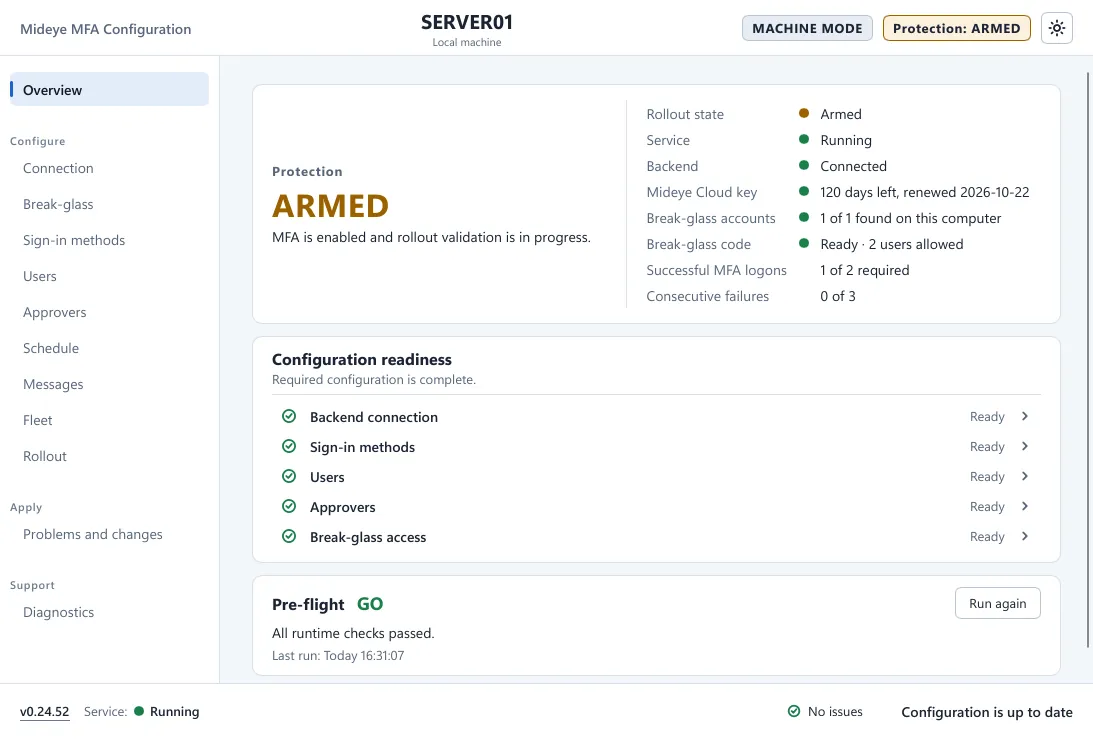
Protection card
Section titled “Protection card”The big word is the rollout state of the computer. The sentence under it explains it.
| State | Meaning |
|---|---|
| OFF | “MFA currently does not affect Windows sign-in on this machine.” The Mideye tile is not shown and Windows’ own sign-in is used. This is how a fresh install starts. |
| ARMED | “MFA is enabled and rollout validation is in progress.” The Mideye tile is shown next to the other tiles. |
| ACTIVE | “MFA is enforced for Windows sign-in, unlock, and Remote Desktop.” Only the Mideye tile is shown. |
| UNKNOWN | The state could not be read on this computer. |
The rows next to it are the facts behind the state.
| Row | What it shows |
|---|---|
| Rollout state | Off, Armed, Active, or Disarmed after failed sign-ins. The Rollout page names the same steps Disabled, Armed, Activated and Disarmed. |
| Service | Whether the Mideye service runs. |
| Backend | Connected, Unreachable or Not configured. |
| Mideye Cloud key | Only with Mideye Cloud. The days left before the key expires, and the date it was renewed. Yellow from 30 days, red from 7. |
| Break-glass accounts | For example “2 of 2 found on this computer”. A name the computer cannot find counts as missing. |
| Break-glass code | Ready, Not set up yet, Off, and on a Fleet computer Waiting for Fleet or Managed by Fleet. |
| Successful MFA logons | For example “3 of 2 required”: how far the computer is towards becoming active. |
| Consecutive failures | For example “1 of 3”: how many failed sign-ins in a row it has had while armed. |
A button Turn on MFA opens the Rollout page. It says Finish the checklist first. until the checklist below is complete.
Configuration readiness
Section titled “Configuration readiness”A checklist of what the configuration still needs. Each line is Ready, Required, Not configured (default) or Warning, and has an arrow that opens the page that owns it.
| Item | Ready when |
|---|---|
| Backend connection | Mideye Cloud has a client ID, or Mideye Server has at least one server. Required until then. |
| Sign-in methods | At least one method is on. |
| Users | There is at least one login-type row or one local-account mapping. With none, the line says Not configured (default): everyone follows the schedule. |
| Approvers | Only with Mideye Cloud. There is at least one approver. With Mideye Server, approvers are set on the server and the line is not shown. |
| Break-glass access | At least one break-glass account is set. Required until you add one. |
A line says Warning when its page has a problem.
Needs attention
Section titled “Needs attention”When something is wrong, a card titled MFA requires attention appears with the reason and a button to the right place. For example:
- The service refused the last configuration it was given.
- The service is not running.
- Backend connectivity has been lost (Troubleshoot).
- The Mideye Cloud key needs attention (Open Connection). Enter a new key before sign-ins stop working.
- A break-glass account was not found on this computer (Review break-glass access).
- MFA was switched off after failed sign-ins (Open Rollout).
- On a Fleet computer: Mideye Fleet cannot be reached. The computer keeps running with its last configuration (Open Fleet).
Pre-flight
Section titled “Pre-flight”Pre-flight is a short check of the running computer. The result is GO, NO-GO or UNKNOWN. Run again repeats it. View results lists each check.
| Check | What it looks at |
|---|---|
| MFA service | The service is running. |
| Backend | The backend answers. |
| Break-glass accounts | Every break-glass account exists on this computer. |
| Credential filter | The Windows sign-in integration is healthy. |
| Configuration | The service loaded and applied the configuration. |
| Remote Desktop | MFA is enforced for RDP. Before activation it says “Will be enforced once protection is active”. |
Author mode and Fleet
Section titled “Author mode and Fleet”In author mode the page shows the readiness of the document only. The live state is shown on a computer. On a computer managed by Fleet the page is read-only.